
Browser Tool
Online Converter
Combine a 32-bit HDR TIFF (Rec.2020, from Lightroom Classic or Camera Raw) with your SDR base JPEG into one Ultra HDR JPEG. Uses the same libultrahdr encode path as the Lightroom plugin.
All processing happens in your browser. Files never leave your device.
How to export in Lightroom or Camera Raw
Export two files with matching dimensions from Lightroom Classic or Camera Raw, then upload them below.
-
Export HDR TIFF
In File Settings (Lightroom Classic or Camera Raw), choose TIFF, ZIP compression, HDR Rec. 2020, 32 bits/component, and enable HDR Output. Export at the same pixel size as your final image.
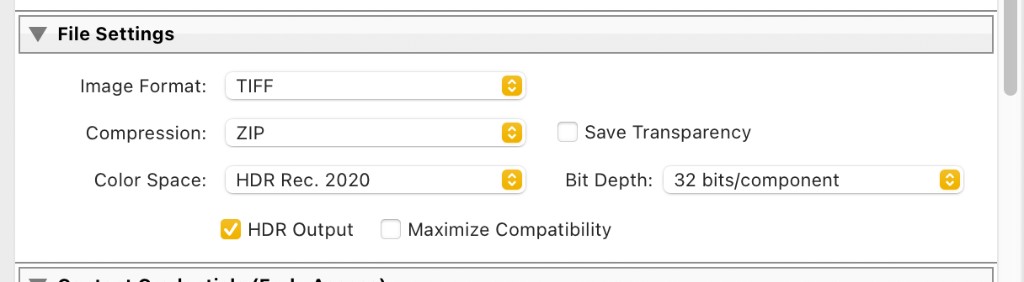
HDR TIFF export settings in Lightroom Classic or Camera Raw. -
Export SDR JPEG
Export again with JPEG, sRGB, quality around 90, and HDR Output turned off. Match the HDR export dimensions exactly.
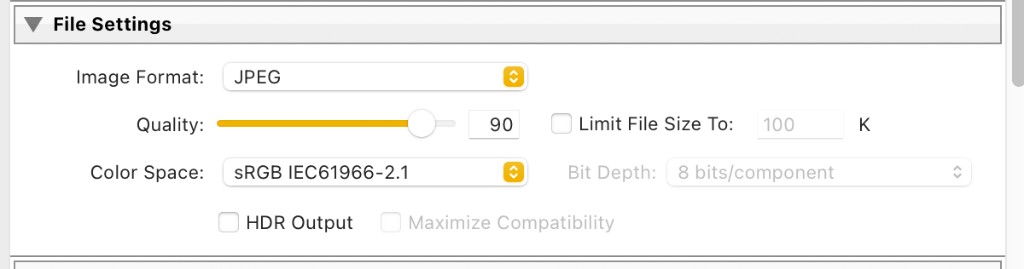
SDR JPEG base export settings in Lightroom Classic or Camera Raw. -
Upload and convert
Drop both files into the upload zones below and click Convert to Ultra HDR JPEG. Preview the result and gain map, then download.
Upload & convert
Both files must share the same width and height.
- HDR TIFF
- SDR base
- Convert
HDR TIFF
32-bit float Rec.2020 from Lightroom or Camera Raw
SDR base
JPEG, PNG, WebP, or TIFF — scaled to HDR size
Encoding Ultra HDR JPEG…
Conversion complete
Ultra HDR JPEG ready to download